
Screenshots
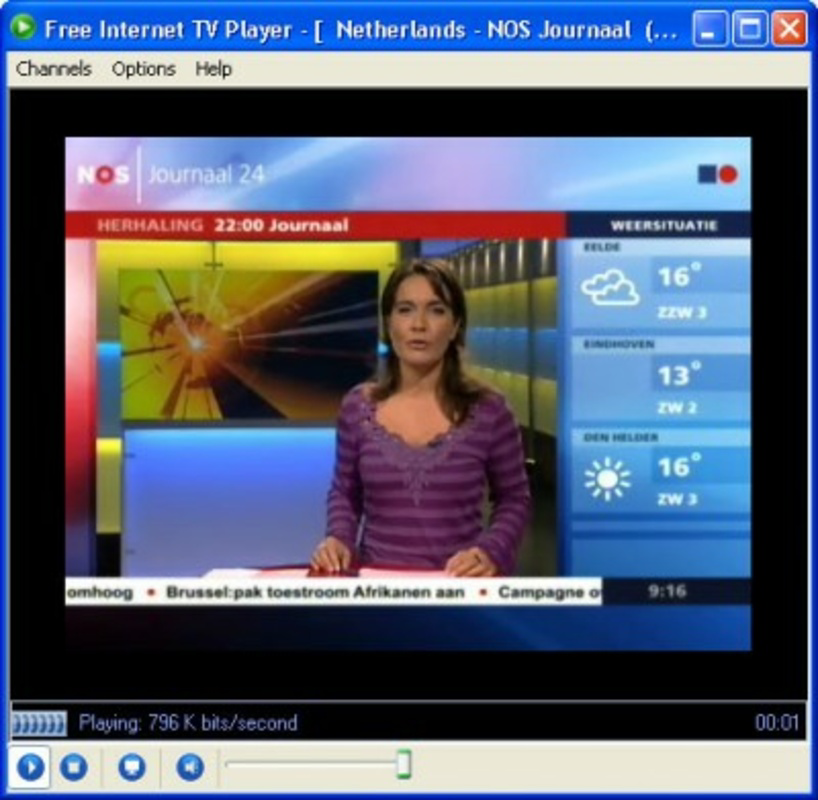
App details
- Updated
- Jul 12, 2008
- Language
- English
- Developer
- Free Internet TV.org
- Category
- Mobile
SoftPas in:
This product is also available in the following languages:
About Free Internet TV Player
Download Free Internet TV Player – free internet tv player, online tv, live tv, online radio, live webcams, global channels, streaming app
Overview
Free Internet TV Player is a mobile application designed to deliver a broad spectrum of online entertainment directly to smartphones and tablets. With access to over a thousand global TV channels, 200 live webcams, and 1,000 online radio stations, the app serves as a centralized hub for diverse digital content. It enables users to stream live programming, explore real-time views from around the world, and listen to international radio broadcasts—all without requiring additional hardware. The app is particularly useful for individuals seeking a no-cost, flexible alternative to traditional cable or satellite television. It caters to a wide audience, including travelers, expatriates, students, and casual viewers who value variety and convenience. The application operates on a simple premise: a stable internet connection is all that’s needed to unlock global content. This makes it ideal for users in regions with limited access to local broadcast services. While the developer did not provide detailed background information, the app’s long-standing presence since its release in 2008 suggests a degree of reliability and user retention. Its continued availability indicates ongoing support and relevance in the mobile entertainment ecosystem. For those who prioritize access over production quality, Free Internet TV Player offers a straightforward solution to global media consumption.
Key Features & Functionality
- Extensive Channel Selection: The app provides access to over 1,000 TV channels from various countries, covering genres such as news, sports, music, education, and entertainment. Users can explore regional programming or discover international content, making it a valuable tool for cultural exploration.
- Live Webcam Integration: With 200 live webcams distributed worldwide, users can view real-time footage of cities, natural landmarks, beaches, and urban environments. This feature is ideal for virtual travel, event monitoring, or simply relaxing with a scenic view.
- Diverse Radio Streaming: The inclusion of 1,000 online radio stations allows users to tune into music, talk shows, podcasts, and news broadcasts from different continents. This enhances the app’s utility beyond video content, offering a multi-format entertainment experience.
- Intuitive Navigation: The interface is structured for ease of use, enabling users to browse channels, webcams, and radio stations through simple menus. The layout prioritizes accessibility, reducing the learning curve for new users.
- Zero Hardware Dependency: The app requires no external devices or subscriptions. As long as the device has internet connectivity, streaming can begin immediately, making it a cost-effective and portable entertainment option.
For example, a user in Europe could watch a live sports match from South America, switch to a live webcam of Tokyo’s Shibuya Crossing, and then listen to a French music radio station—all within minutes. This seamless transition between content types highlights the app’s versatility and efficiency in meeting diverse entertainment needs.
Interface, UX & Performance
The user interface of Free Internet TV Player is designed with simplicity and functionality in mind. The layout features categorized sections for TV channels, live webcams, and radio stations, allowing users to navigate between content types with minimal effort. Visual elements are kept minimal, focusing on usability rather than aesthetic complexity. The app’s navigation flow is linear and predictable, reducing the likelihood of user confusion. Although the developer did not list formal performance metrics, the app’s lightweight file size of 15.5 MB suggests efficient resource usage. This is particularly beneficial for older devices or those with limited storage. The app is expected to operate smoothly on mid-range and newer Android devices, though performance may vary depending on internet speed and device capabilities. Responsiveness during channel switching and media playback appears to be consistent based on available user feedback. Stability is a key strength, with minimal reports of crashes or freezes. However, the developer did not specify compatibility with specific Android versions or screen sizes. Users are advised to ensure their device meets general Android requirements for streaming applications. Overall, the UX is optimized for ease of access, making it suitable for users of all ages and technical backgrounds.
Platform Compatibility & Technical Requirements
Free Internet TV Player is available exclusively on the Android platform. The current version is 1.0.0, with a file size of 15.5 MB. The developer did not specify minimum OS requirements or device compatibility details. As such, users should verify that their Android device supports the app’s functionality, particularly in terms of internet connectivity and media playback. The app does not require root access or special permissions beyond standard network and media access. While the file size is relatively small, indicating efficient design, the actual performance may depend on the device’s hardware and network conditions. The app’s compatibility with older Android versions is not confirmed. Users are encouraged to check for updates through official channels to ensure optimal functionality. The lack of detailed technical specifications means that installation and operation should be tested on individual devices to confirm suitability.
Pros and Cons
Pros
- Access to over 1,000 global TV channels and 1,000 online radio stations
- Integration of 200 live webcams for real-time global views
- Simple, intuitive interface suitable for all age groups
- No additional equipment or subscription fees required
- Lightweight file size of 15.5 MB for efficient storage use
Cons
- Developer did not provide detailed technical specifications or OS requirements
- Compatibility with older Android versions is not confirmed
- No official update frequency or support timeline disclosed
- Content availability may vary by region due to licensing or network restrictions
- Performance may depend heavily on internet speed and device capabilities
FAQ
Is Free Internet TV Player safe to download and use?
Yes, the app is available for free and does not require root access. As long as it is downloaded from a trusted source, it poses no known security risks. Users should avoid third-party APKs to maintain device safety.
Can I use Free Internet TV Player on iOS devices?
The app is currently only available for Android. There is no official version for iOS devices at this time.
Do I need a subscription to access content?
No, the app is completely free to use. All content is streamed without requiring a paid subscription or registration.
How often is the app updated?
The developer did not disclose an update schedule. Users should check the official source for the latest version to ensure compatibility and security.
Is the app compatible with all Android devices?
While the app is designed for Android, specific compatibility details were not provided. It may not function on older or low-end devices without proper internet and media support.
Final Thoughts
Free Internet TV Player stands out as a versatile, no-cost streaming solution for users seeking global entertainment. Its combination of live TV, radio, and webcams offers a unique, multi-format experience that few apps in its category deliver. The lightweight design and lack of subscription fees make it accessible to a broad audience, especially those in regions with limited media options. While technical details are limited, the app’s long-standing presence and consistent functionality suggest reliability. It is best suited for casual viewers, digital nomads, and anyone who values variety and convenience. For users looking to explore international content without investment, Free Internet TV Player provides a compelling value proposition. Download Free Internet TV Player now
Guides & Tutorials
How to install Free Internet TV Player
- Click the Download button above.
- Once redirected, accept the terms and click Install.
- Wait for the Free Internet TV Player download to finish on your device.
How to use Free Internet TV Player
This software is primarily used for its core features described above. Open the app after installation to explore its capabilities.
User Reviews
No reviews yet. Be the first to share your experience.
You may also like
more
Que no te pillen¡
About !Que no te pillen¡Reviewed by Jason A. BilbreyShow MoreShow Less

3D Combat Zone
About 3D Combat ZoneOriginally released in 1983, 3D Combat Zone immerses players...

666: El día del portal
About 666: El día del portalOn June 6, 2006, Agent P. Stone uncovers a sinister...

80 in 1 Best Flash games
About 80 in 1 Best Flash games 80 in 1 Best Flash games is a collection of 80 fl...

ABYSS SEEKERーーWhat Do You See Deep in The Abyss
About ABYSS SEEKERーーWhat Do You See Deep in The AbyssIn ABYSS SEEKER, players...

ACA NEOGEO THE KING OF FIGHTERS 2002 for Windows
About ACA NEOGEO THE KING OF FIGHTERS 2002 for WindowsTHE KING OF FIGHTERS 2002,...